Word Tiles GO
Gulliver's GamesWord
4.7863.00 Reviews
- Version
- 3.2.23
- Installs
- 100.00K
- Age Rating
- Everyone
Screenshots
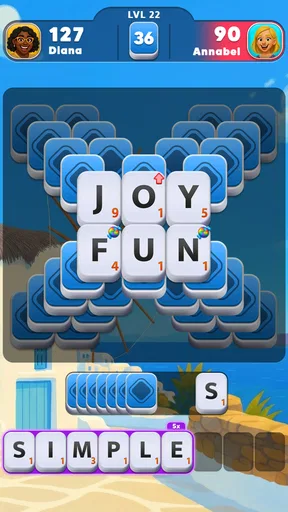
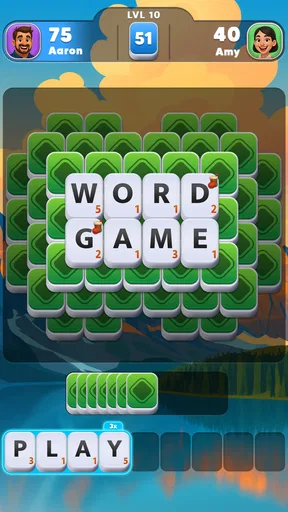
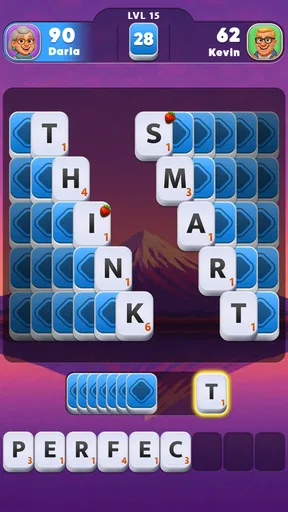
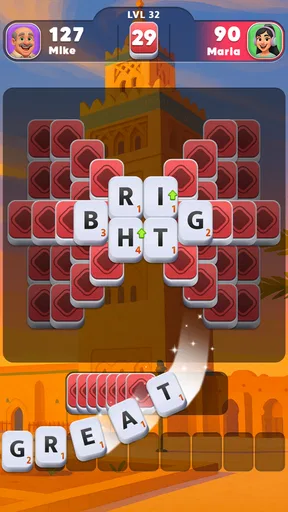


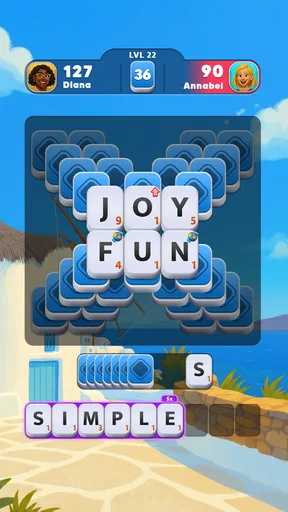
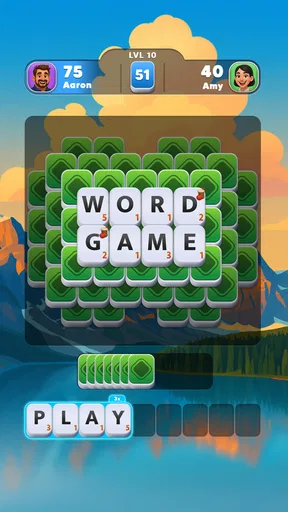
Our Review of Word Tiles GO
 Analysis by Appyee
I like word games best when I can dip in for a few minutes without needing to learn a complicated set of rules. Word Tiles GO aims for that quick-start appeal: its tile-and-letter puzzles make it easy to see what to do, while the challenge can build as you continue. I found that combination most appealing for short breaks, when I want something more involving than scrolling but don’t have time to settle in for a long session.
Small goals make it easy to begin
The first useful goal is simply getting comfortable with the basic puzzle: swipe across letters, make words, and work toward a solution. The short tutorial gets that idea across without making a newcomer sit through a long explanation. I’d recommend starting with the tutorial rather than tapping through it, because noticing how the letter connections work makes later puzzles less frustrating.
After that, the daily challenges offer a clear reason to return. They give a session a natural endpoint: open the game, take on the day’s puzzle, and stop when you’re done. That structure suits a commute, a quiet coffee break, or a few minutes waiting for an appointment. It also means the game doesn’t need to be treated as a long campaign to feel worthwhile.
There’s a practical distinction between playing for a quick mental break and trying to clear puzzles as fast as possible. I enjoyed the former more. If I hurried, I was more likely to overlook a word or make the experience feel like a chore. Taking a moment to scan the available letters is a better fit for the relaxed, bite-sized way I’d use this game.
Progress feels best when you set your own pace
Finding a word gives you an immediate sense of progress, and the game’s increasing challenge helps keep that basic action from feeling identical every time. The appeal is less about a complicated progression system and more about seeing whether I can solve the puzzle in front of me. That makes it easy to pick up after a few days away without having to remember a story or a long chain of objectives.
Hints are helpful when a puzzle has stopped being satisfying and started being irritating. I’d save them for a genuine sticking point rather than using one as soon as I slow down. Giving myself another pass through the letters often feels more rewarding, while a hint can restore momentum when I’m out of ideas. That small choice makes the hint system useful without turning it into the main way I play.
The difficulty curve is a matter of personal tolerance. Players who like gradually tougher word puzzles may enjoy the push, but anyone expecting every level to remain effortless should know that the challenge can rise. I see that as a reasonable trade-off: a puzzle game needs moments that make you pause, though a particularly tiring day may be a better time to stop than to force a solution.
Where it fits among word games
Compared with a crossword, this is a more direct, touch-led activity: you’re connecting letters rather than filling a grid from written clues. Compared with a word-search game, it asks you to form words from the available tiles, so vocabulary and pattern spotting matter in a different way. I’d choose it when I want a compact puzzle with a clear action, and choose a crossword instead when I’m in the mood for clues and a longer train of thought.
The daily challenges and the ability to connect with friends and compare leaderboard positions add reasons to revisit a puzzle beyond solving it once. I’d treat that competition as optional seasoning, not a requirement. If leaderboards motivate you, they can give a familiar activity a social edge; if they make a relaxing game feel like an obligation, it’s easy to focus on your own puzzle goals instead.
In everyday use, the game works particularly well as a short break between tasks. I might open it while waiting for a friend, try the daily puzzle, and put my phone away once I’ve made progress or run out of patience. That’s a healthier way to enjoy it than expecting every session to fill an entire evening. It is also a useful choice for someone who wants a simple word-game routine but doesn’t want to commit to a complex narrative or a long match.
Who should pick it up—and who might prefer something else
I’d point casual word-game fans toward this one if they like forming words, appreciate a quick tutorial, and enjoy a daily puzzle to return to. It may also suit someone who wants a light activity to share indirectly with friends through leaderboard comparisons. The game is free to download, is rated for Everyone, and is made by Gulliver’s Games. Its average rating is 4.7 from around 8,400 ratings, with more than 100,000 installs, which suggests it has found an audience without being a reason by itself to assume it will match every player’s taste.
I would steer away from it if you mainly want clue-heavy crosswords, a quiet solo game with no competitive element at all, or puzzles that never become demanding. Those preferences point toward a different kind of word game. It’s also worth thinking about how you respond to optional purchases: the game includes in-app items priced from $0.99 to $99.99 each. I didn’t need to spend to enjoy the basic puzzle loop, but I’d avoid buying anything just because I’d hit a difficult moment. Pause, try the letters again, and decide later whether a purchase actually adds value for you.
Practical details and a fair verdict
The game was released on May 24, 2025, and its current version is 1.6.32. It requires Android 7.0 or later, so checking your device’s system version before installing is a straightforward way to avoid a compatibility surprise. The 408 written reviews offer a different kind of signal from the average rating: reading a few recent comments can help you judge whether other players’ expectations line up with your own, especially if you care more about puzzle difficulty or social play than overall popularity.
My main reservation is that the strengths here depend on wanting this particular kind of word puzzle. The tile-swiping format is approachable, but it won’t replace a crossword’s clue-solving or a word search’s leisurely scanning. The leaderboard can be motivating for some and distracting for others, and rising difficulty is welcome only up to the point where a short break still feels relaxing. I’d use hints sparingly, treat daily challenges as invitations rather than chores, and let a puzzle wait when I’m no longer enjoying it.
Getting Started with Word Tiles GO
Once I downloaded Word Tiles GO from the app store, I was greeted by a sleek and inviting interface. The app’s design is clean and colorful, making it easy on the eyes, which is a big plus when you're planning on spending a good chunk of time playing. Navigation is intuitive, so you can jump right into the action without fumbling around. I love how user-friendly it is, especially if you're not particularly tech-savvy.
The game starts with a short and sweet tutorial, which walks you through the basics. Even if you're new to word games, you'll get the hang of it in no time. The objective is to swipe and connect letters to form words and solve puzzles. Simple, right? But don't be fooled; as you progress, the challenges ramp up, keeping you on your toes.
Features That Stand Out
One of the features I appreciate most is the daily challenges. These are a fantastic way to keep the game fresh and exciting. Each day brings a new puzzle to solve, and completing them earns you rewards. It's a great incentive to keep coming back day after day.
Another feature I love is the hint system. We've all been there, stuck on a word or puzzle with no idea how to move forward. In Word Tiles GO, you can earn hints, which are a lifesaver when you're in a bind. Plus, the app offers in-app purchases if you're in a hurry, although I found that you can easily enjoy the game without spending a dime.
Why You'll Keep Playing
What really sets Word Tiles GO apart from other word games is its level of engagement. The puzzles are cleverly designed, and the progression is well-paced. I never felt bored or overwhelmed, which is a delicate balance to strike in a mobile game. The satisfaction of finding that elusive word is immensely rewarding, and it kept me hooked for hours.
The community aspect is another big draw. You can connect with friends and compete on leaderboards, which adds a social element to the game. It's always fun to see how you stack up against others and adds a bit of friendly competition to the mix.
Final Thoughts
Overall, I had a blast playing Word Tiles GO. It's a well-crafted game that manages to be both challenging and relaxing at the same time. Whether you're a seasoned word game enthusiast or just looking for a fun way to pass the time, this app is worth checking out. The combination of engaging puzzles, daily challenges, and social features makes it a standout choice in the crowded world of word games.
If you're ready to put your vocabulary to the test, head over to your app store and download Word Tiles GO. Trust me, you won't be disappointed!
Privacy and Permissions
See what permissions an app requests and how it handles your data.
- Phone
- read phone status and identity
- Photos/Media/Files
- read the contents of your USB storage, modify or delete the contents of your USB storage
- Storage
- read the contents of your USB storage, modify or delete the contents of your USB storage
- Wi-Fi connection information
- view Wi-Fi connections
- Device ID & call information
- read phone status and identity
- Other
- view network connections, full network access, control vibration, prevent device from sleeping, Google Play license check, read Google service configuration
Verdict
Strengths of Word Tiles GO
- Engaging word puzzles for all ages
- User-friendly interface and design
- Frequent updates with new levels
- Offline mode available for travel
- Minimal ads enhance gameplay
Limitations of Word Tiles GO
- In-app purchases can be pricey
- Limited hints in free version
- Occasional lag on older devices
- Repetitive background music
- Requires internet for leaderboards
Similar Picks in This Category
View All
Word Search - Word Puzzle Game
Bluetile4.8

Word Search Quest - Puzzles
Blackout Lab4.8

CodyCross: Crossword Puzzles
Fanatee, Inc.4.7

Words of Wonders: Crossword
Fugo Games4.9

Wordscapes: Word puzzle game
PeopleFun4.7

Word Search Explorer
PlaySimple Games4.9
Frequently Asked Questions
What is Word Tiles GO and how does it work?
Word Tiles GO is a word puzzle game that challenges players to form words from a jumble of letters. The game features various levels with increasing difficulty, requiring players to connect letters to form valid words. It’s designed to enhance vocabulary and provide a fun, engaging experience for word game enthusiasts.
Is Word Tiles GO free to play, and are there in-app purchases?
Word Tiles GO is free to download and play. However, it does offer in-app purchases that allow players to buy hints, remove ads, or unlock additional levels. While the game can be enjoyed without spending money, these purchases can enhance the gaming experience by providing extra support or content.
Does Word Tiles GO require an internet connection to play?
Word Tiles GO can be played offline, which makes it convenient for users who don’t have consistent internet access. However, certain features, such as in-app purchases and leaderboard updates, do require an internet connection. Playing offline is perfect for those on the go or in areas with limited connectivity.
What age group is Word Tiles GO suitable for?
Word Tiles GO is suitable for players of all ages, though it is particularly beneficial for older children and adults who enjoy word games. The game’s difficulty increases with each level, offering a challenging and educational experience that helps improve vocabulary and cognitive skills, making it family-friendly and educational.
How can I get help if I encounter issues with Word Tiles GO?
If you experience any issues with Word Tiles GO, you can usually find support within the app’s settings or help section. Additionally, you can visit the developer's website or contact their customer support team via email. Most developers also maintain social media profiles where they can provide updates and assistance.
Play our best games!


